How to turn on a Rove vape pen (and what to do if it won’t)
If your rove pen won’t turn on, it’s usually a simple issue: the device is locked, the battery is low, the connection to the cartridge is dirty, or you’re using the wrong click pattern for your battery type. Rove makes a few styles (button-activated pens, draw-activated styles, and some that use “disconnect/reconnect” actions), so the right startup steps depend on what you have.
If you want a quick walkthrough of basics, this guide on how to use a rove vape pen pairs well with the troubleshooting steps below.
Step-by-step: how to activate a Rove vape pen
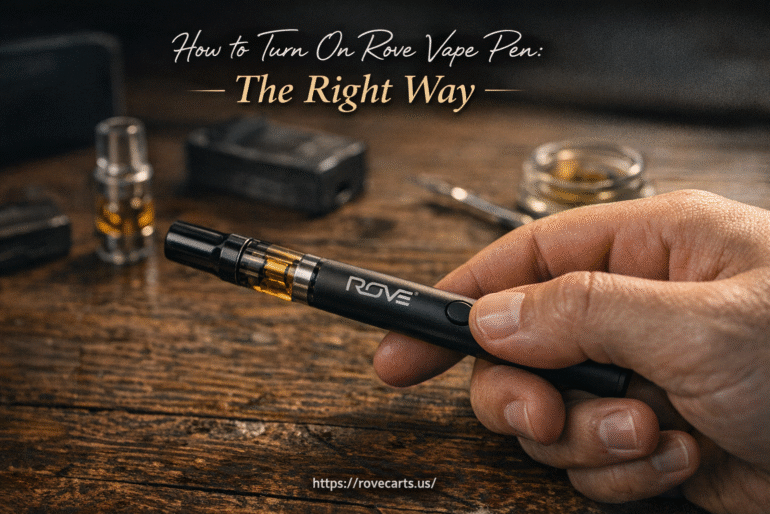
Start by checking for a rove vape pen power button on the body:
- If you have a button: you’ll use click patterns (common on many Rove batteries).
- If you don’t have a button: it may be draw-activated, or it may use “disconnect/reconnect the cartridge” actions to change modes.
For many Rove button batteries, the rove pen button clicks to turn on are:
- Power ON/OFF: press the button 5 times fast.
If the light flashes, that’s usually the confirmation that the device toggled power. If nothing happens, skip to the troubleshooting section, your battery may be dead, locked, or not making contact.
3) If your battery uses cartridge reconnect actions (some pen-style models)
Some Rove pen-style and minibar-style batteries use quick cartridge disconnect/reconnect actions instead of button-click menus:
- Change voltage: disconnect and reconnect the cartridge 3 times to toggle voltage.
- Pre-heat: disconnect and reconnect the cartridge 2 times (often indicated by a green light) and it runs briefly, then stops.
If you’re unsure which model you have, Rove’s official battery instruction hub is a helpful reference for model-specific manuals: https://rovebrand.com/pages/userguide.
When your rove pen won’t turn on: the most common fixes
Charge it first (low battery is the #1 cause)
A battery that’s very low may not respond to clicks the way you expect. Charge using the correct cable and a reliable USB power source. Many Rove devices show a red light while charging, then change behavior when charge is complete (varies by model).
- If the light turns red during inhalation on some models, that can mean the battery is under about 10% and needs charging soon.
- Try a different USB port or a different charging cable if the light never comes on.
For more general charging guidance and safety, the U.S. Fire Administration has a solid overview of lithium-ion battery risks and precautions: https://www.usfa.fema.gov/prevention/home-fires/prevent-fires/lithium-ion-batteries/.
Confirm it isn’t locked (5-click power toggle)
If your rove vape pen on off switch is click-based, fast clicking 5 times typically toggles between locked/off and on. Click too slowly and it may not register. Try again with a quicker rhythm.
Clean the cartridge and battery contacts
Oil residue on the threads or the center pin can prevent the battery from detecting the cartridge, which can look like the rove pen won’t turn on even when it’s charged.
- Remove the cartridge.
- Use a cotton swab lightly dampened with isopropyl alcohol to clean the battery’s threaded area and center contact.
- Let everything dry fully before reconnecting.
Be gentle: pushing the center pin too hard can cause contact problems.
Don’t overtighten the cartridge
Overtightening can press the battery’s contact pin down too far, leading to intermittent power or no response. Screw the cartridge on until it’s snug, then stop.
Try pre-heat if it powers on but won’t hit
Sometimes the pen turns on, but vapor is weak because the oil is thick or the atomizer needs a warm-up. If your model supports it:
- Pre-heat: often 2 fast clicks on button models, or 2 disconnect/reconnects on some cartridge-action models.
Watch for auto-cutoff and “blinking” behavior
Some Rove devices include an inhale time limit (often around 8 seconds). If you hold a draw too long, the light may blink and the device stops firing. Take shorter pulls and give it a moment between hits.
Rove pen startup instructions by situation
If you have a new battery or it’s been stored awhile
- Charge for 20–30 minutes first.
- Then try 5 fast clicks to power on.
- Attach the cartridge snugly (not tight) and take a short test pull.
If you’re using a disposable
Many disposables are draw-activated and may not have a traditional power button workflow. If you’re shopping or checking compatibility, see these rove disposable carts.
If the light turns on but nothing happens when you inhale
- Clean contacts (battery + cartridge base).
- Try pre-heat.
- Test with a different compatible cartridge if you have one (to isolate whether the issue is the battery or the cart).
When to stop troubleshooting and replace the device
If the pen has been dropped, exposed to water, or the battery gets hot while charging, stop using it. Also consider replacement if:
- The device won’t take a charge from multiple known-good cables/ports.
- The power button feels stuck or doesn’t click normally.
- The light behavior is erratic and cleaning doesn’t help.
If you’re comparing options or budgeting for a replacement, you can check current listings at Rove Vape Price.
Quick checklist (fast fixes in 60 seconds)
- Charge it for at least 20 minutes.
- Try 5 fast clicks (on/off).
- Remove cartridge, clean contacts, reconnect snugly.
- Try pre-heat (if your model supports it).
- Swap cartridges to test if the cart is the issue.